Organize with confidence
Start with a ready-made category tree for Effects, Generators, Titles, Filters and Transitions. Add your company and product names, then place macro and icon files at the selected destination.
EoF DRFX Bundle Builder turns Fusion macros, icons and product details into an organized DRFX bundle on your Mac. Prepare the structure, save the project, build the package and install it where you need it.
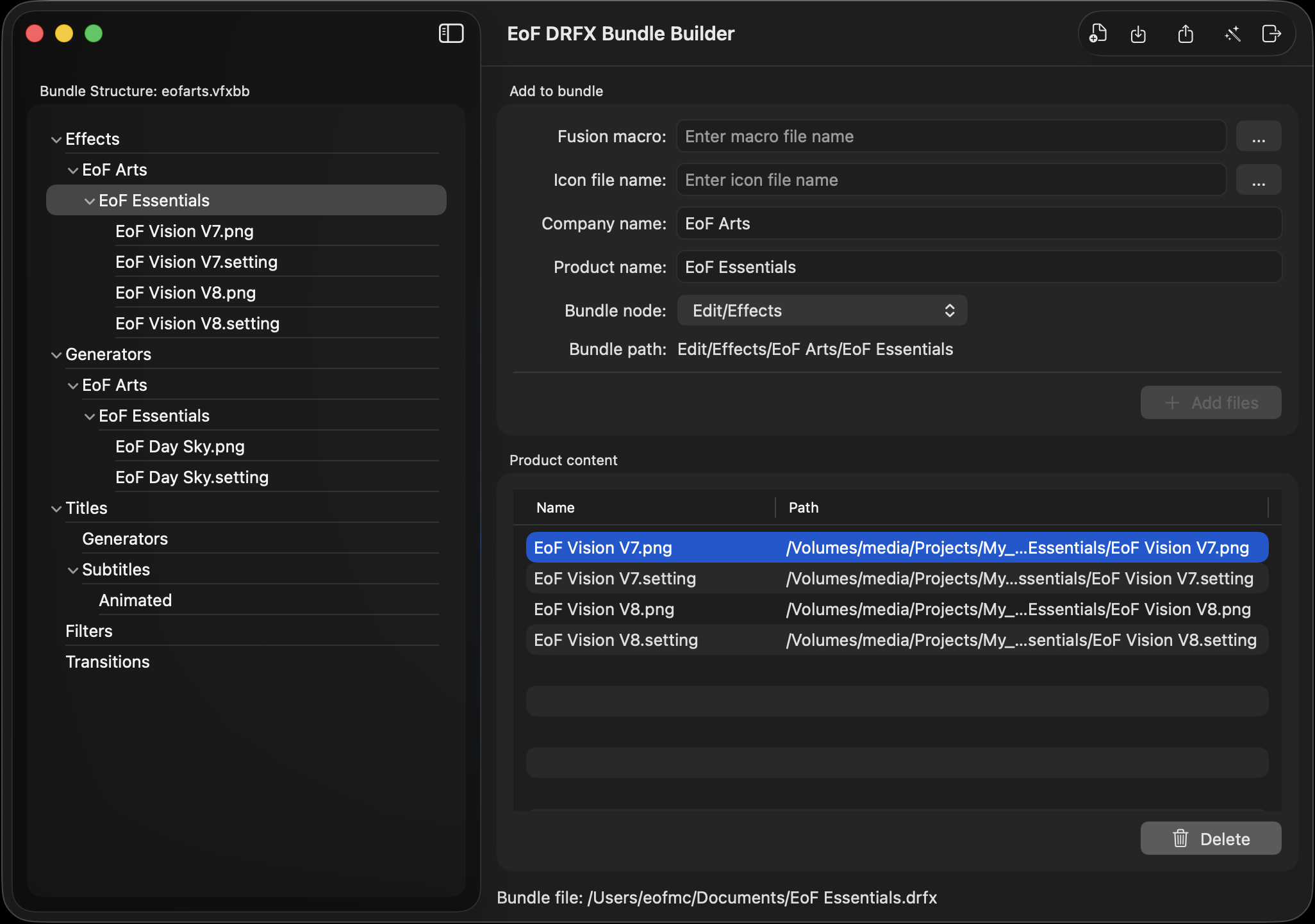
A focused workspace for the steps between a Fusion macro and an installable DRFX package.
Start with a ready-made category tree for Effects, Generators, Titles, Filters and Transitions. Add your company and product names, then place macro and icon files at the selected destination.
Save a bundle structure as a .vfxbb project and load it again later. Review the resulting bundle path and product contents before creating the final package.
Create a .drfx bundle in the folder you choose. When a compatible Templates folder is available, install directly for DaVinci Resolve, Blackmagic Fusion or both.
A quick path from first launch to a finished DRFX bundle.
On first launch, complete Security Scopes and select the files or folders the app may access. You can review these permissions later in Settings.
Choose New Bundle, select a destination category and enter your company and product names. Choose a Fusion .setting or .settings macro and an icon image.
Click Add files to create the company and product nodes with their content. Check the bundle path and product list; remove any items you do not need.
Use Save to keep a .vfxbb project. Choose Build to create the .drfx file, then Install to copy it to an available Resolve or Fusion Templates folder.
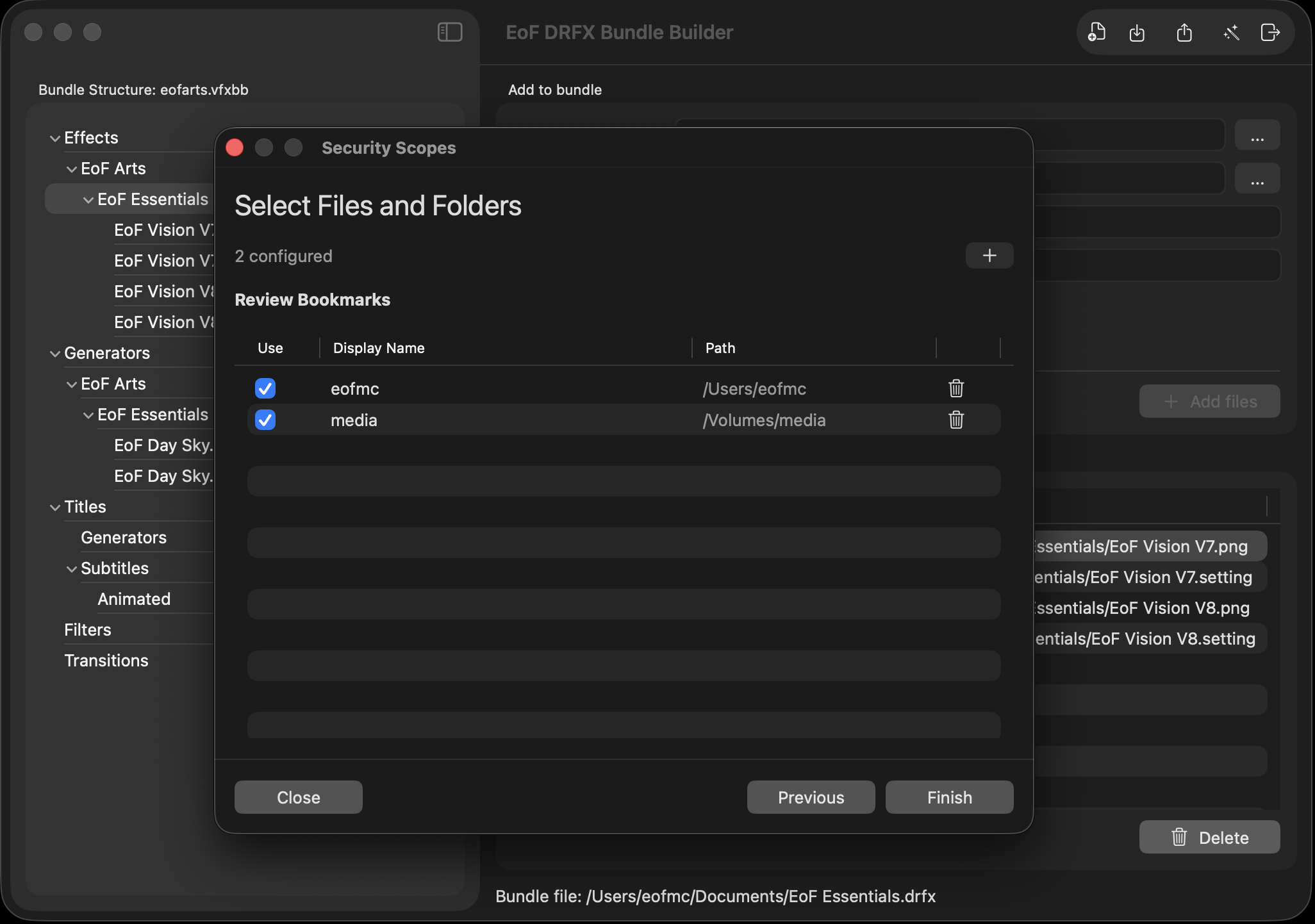
Two focused views: one for your bundle and one for the local resources it may access.
Navigate the category tree, choose macro and icon files, set company and product details, and review every file before building.
Add, rename, enable or remove approved file and folder locations. The same assistant appears during first-launch setup and in Settings.
End User License Agreement and Privacy Notice for the app and this support website.
Effective date: 29 November 2026
This End User License Agreement (“Agreement”) is between you and EoF Software Labs (“Developer”). It governs your use of EoF DRFX Bundle Builder (“App”). By installing or using the App, you agree to this Agreement. If you do not agree, do not install or use the App.
Subject to this Agreement, the Developer grants you a personal, limited, non-exclusive, non-transferable, revocable license to install and use the App on Apple-branded devices you own or control, for your personal or internal business purposes, in accordance with any applicable store terms. The App is licensed, not sold.
You may not copy, modify, redistribute, sell, sublicense, reverse engineer, decompile or attempt to derive the source code of the App, except to the extent such a restriction is prohibited by applicable law or permitted by an applicable third-party license. You may not use the App unlawfully or interfere with files, devices or services you do not own or have permission to use.
You are responsible for the files you select, the names and paths you enter, and the bundles you build or install. Keep backups of source files, .vfxbb projects and existing .drfx packages. Verify the bundle structure and test generated packages with your version of DaVinci Resolve or Blackmagic Fusion before distribution or production use. Behavior can vary with file content, folder permissions, application versions and operating-system configuration.
The App and its original content are owned by the Developer or its licensors. Your macros, images and other content remain yours or belong to their respective rights holders. Apple, macOS, Blackmagic Design, DaVinci Resolve and Fusion, and related marks belong to their respective owners. This independent App is not affiliated with, sponsored by or endorsed by Blackmagic Design or Apple.
The Developer may update, change or discontinue the App or individual features. This Agreement applies to updates unless an update is accompanied by different terms. Compatibility with future operating systems, file formats or third-party applications is not guaranteed.
To the maximum extent permitted by law, the App is provided “as is” and “as available,” without warranties of any kind, whether express, implied or statutory, including merchantability, fitness for a particular purpose and non-infringement. Nothing in this Agreement excludes rights or warranties that cannot be excluded under applicable law.
To the maximum extent permitted by law, the Developer will not be liable for indirect, incidental, special, consequential or exemplary damages, or for loss of data, files, profits or goodwill arising from use of the App. Where a monetary limitation is legally permitted, the Developer’s total liability for claims relating to the App will not exceed the amount you paid for the App during the 12 months before the event giving rise to the claim. These limits do not apply where prohibited by law, including liability that cannot legally be limited.
This Agreement ends automatically if you materially breach it. You may end it at any time by uninstalling and ceasing to use the App. On termination, stop using and delete your copies of the App. This does not delete projects or bundles you created.
This Agreement is governed by the laws applicable to the Developer’s place of residence, excluding conflict-of-law rules, except where mandatory consumer protection law provides otherwise. If any provision is unenforceable, the remaining provisions remain in effect. This Agreement is the complete agreement concerning the App and does not limit non-waivable statutory rights.
This is a general-use license notice, not legal advice. Local consumer laws may provide additional rights.
Effective date: 29 November 2026
This notice explains how EoF DRFX Bundle Builder (“App”) and this static support website handle information. The App is a local file-packaging utility. This website is informational and includes no analytics, advertising trackers, accounts or server-side contact submission service.
The App processes the macro files, icon images, company and product names, bundle structure and local paths you provide. It reads approved source files, writes .vfxbb projects and .drfx packages at locations you choose, and can copy a built package to a local DaVinci Resolve or Fusion Templates folder. Temporary staging data created during a build is removed after the operation.
The App stores interface and workflow settings locally, which can include recent project, input, output and installation paths. Security-scoped bookmarks retain file or folder permissions you approve so the sandboxed App can access those resources. A .vfxbb project can also contain local file paths needed to reconstruct its bundle structure. Review project files before sharing them if those paths are sensitive.
The inspected App project is configured without incoming or outgoing network-connection entitlements and does not include a developer-operated account, analytics or advertising service. The App can ask for macOS notification permission to report build and installation results. macOS, the App Store and other system services may process information under their own privacy terms.
If you use the contact form, your email application opens with a draft addressed to the support contact. The form does not transmit data to this website. Information is sent only if you choose to send that email, and is then handled by your email provider and the recipient. Avoid including passwords, private keys, licensed source content or other sensitive information. Do not attach files solely to demonstrate a problem unless they are necessary and you have the right to share them.
This static page uses no first-party cookies, analytics or advertising pixels and loads no third-party fonts or scripts. Your browser and the website’s hosting provider may process standard technical request data, such as IP address, requested URL and timestamp, to deliver and protect the page. Any such processing is subject to the hosting provider’s own policies.
The Developer does not receive information through this website’s contact form unless you send an email. Support correspondence is retained only as needed to respond, maintain support records or meet legal obligations. Local App data remains on your device until you remove it, delete the associated files or uninstall and clear the App’s data. Depending on where you live, you may have rights to request access, correction or deletion of personal information held by the Developer; contact support to make a request. The App and website are not directed at children under 13, and no personal information is knowingly collected from children through this site.
No software, transmission or storage method can be guaranteed completely secure. Use macOS permissions and backups appropriate to your files. This notice may be updated when the App or site practices change; the effective date above will be revised. For privacy questions, use the Contact support form.
The people, platforms and product names behind the DRFX building workflow.
EoF DRFX Bundle Builder is designed and developed by EoF Software Labs. The native Mac project uses Apple’s SwiftUI, AppKit, Foundation, StoreKit, UserNotifications and Uniform Type Identifiers frameworks.
App and original website content: Copyright © 2026 EoF Software Labs. All rights reserved. The macOS system zip tool is used locally to package the staged bundle structure.
Blackmagic Design, DaVinci Resolve and Fusion are trademarks and/or registered trademarks of their respective owner. Product names are used only to identify compatible workflows and installation destinations.
Apple, macOS and Mac are trademarks of Apple Inc. EoF DRFX Bundle Builder is an independent utility and is not affiliated with, sponsored by or endorsed by Blackmagic Design or Apple. Third-party macros, icons and other bundled content remain subject to their own rights and license terms.
Set up the structure, review the product content and create a DRFX bundle without leaving your Mac.
Tell us what you need help with or share an idea. Your email app will open with your message ready to send.